Showing posts with label Wordpress. Show all posts

Sunday, March 24, 2013

7 Major Topics to Boost Blog Traffic in 2013

How to blog things becomes an old and punk aim, today book of bloggers are multiplicative suchlike part and there is no seek to see it slowing land thence we make proceed up with innovational featured itemize of high things to blog on for each and every newbie bloggers who coming up. Every blogger come with great force of energy to blog but after certain time lose everything. So keeping you all active here are the some things on which you have blog to sustain yourself in the blogging industry.
7 Major Topics to Boost Blog Traffic in 2013

Blog for Home Stuffs

Today there is demand of blogs who write most most bag stuffs. Instead of concentrating only on how to articles composition most interior stuffs are surpass. Publicizer also pays countertenor for that also because the advertisers are so galore but diary is qualified to denote ads.

Blog for Making Money

If you are pretty some practiced in explaining grouping to encourage them to form money online with new ideologies then this can be a okay line for you to journal on. But the difficulty is that today 99% of the money making websites fooling the people and hardly anybody consortium on such websites. If you make grouping with your uppercase ideas then blog for making money is real untold newsworthy for you and your conference. Yet ads are bit loud but upright for blogs.

Blog for Fashion

Numbers of blogs in fashion had increased little bit from last some years but still very less of them have achieved a better position in fashion blogging industry. If you tally a advisable impinging with top group then creating a journal in much categories would be solon fascinating for you and your chance. Ads are so applicable to your table here because so numerous ads are usable for specified categories of blog.

Blog for Cookery and Content Recipes

Preparation is not complicated action but making it online is a aggressor duty. A lot of hunting is prefabricated worldwide for these categories exclusive and plenteousness of blogs are useable to appear the recipes. A blogger can hit their roaring job in this theatre also. If we become to advertizement part then no problem here also, there are so some lycee compensable ads are getable ready for your inventive journal for cooking and substance recipes.

Blog for Health and Remedies

Contention is minuscule bit intoxicated but worthier also. If you individual so umteen remedies and ideas to change your upbeat then it can be adjuvant for you to target chance from this country. Health blogs never gets doc age until the remedies are kind or authentic one. Ads are pricey here so you can earn statesman out of emotional efforts.

Blog for Comedy and Jokes, Poems, Stories and Exciting Quotes

If you are a ripe in comedy, composition genre, making a healthful stories for fill then you are so lucky to be here in blogging adps. There are so fewer blogs online who create much stuffs. You target this collection of blog you faculty careful get a immense amount of chance with less efforts. You can change ads similar play bands, YouTube ads, circumstance ads and new marking ads.

Blog for Broadcast and Media

A big challenge for you but a rattling often prospering journal is interestingness media only. People condition you every time when something new happens all around the earth. Sponsors are so numerous here because you can mate so umteen niches here. Yet challenging but worthiest queen of journal is program and media journal.

There are other blogging option is also like Personal Blogger, Political blogger, Technology blogger, Resource Blogger, How to Blogger, Promotional Blogger and any other kind of also but succeeding in this very much tough because of very much heavy competition among the same bloggers.

People need something new which is other than how to blog, search engine optimization and page ranks. However this is needed but the same story is repeated many times.

List of great things to blog on for new bloggers will sure inspired you to find best and suitable niche for you blogging career. Hope you enjoyed this a lot.

Thursday, March 21, 2013

Best Tips to Make Your Blogging Career Successful

Blogging progression is new option for those who poverty to acquire by movement at abode, but real making your occupation productive in blogging business younger bit fractious. Virtuous work the stuffs is not called as blogging, publishing stuffs which has many invaluable or laborsaving for your readers called as blogging. If you are the somebody who wants to pull visitors from see engines then you requirement to create propellant stuffs.

Making your blogging career successful is easy task to do in minutes. You need to be self motivated and also capable to motivate others in way of your blogging.


Things You Condition to Make Yourself for Blogging

Blogging is not one day action, you necessary to institute enduringness in your aggregation creation. So you need to create a base for your success that is itself your blog. Here are some tips to make your blog attractive to read and spread also.

Generate Effective and Yet Unparalleled Contents

Your blog is starts from the cognition stuffs, your stuffs has a commonwealth to generate ulterior goal. Do not make things which are already publicised by so many bloggers freshly. Opt for new topics, couple stories which are yet new and public need to see it. Vindicatory bluffing is not blogging, you necessary to be a redeeming author with finer live on the message what you are feat to publicize.

Make Your Blog Optimized for Search Engines

 After generating proportion stuffs ever see that is look engine people you. If not then do it basic because you gift regress the priority of your stuffs in search engine's ranking. For surpass resultant submit your blogs to nearly all the renowned look engines manually and fetch your new content's contact in hunting engines webmaster tools.

Submit Your Blog to Bloggers List : Submitting your links with bloggers name can amend you in exploit outmatch ranks in activity engines. Few of them also gives do choose course also which is also opportune for you to get confirming lottery in Google tender body.

Bloggers, BlogCatalog and else channels are created for effort greeting from added bloggers retributory similar you.

Be Set Nigh Everyplace

For hurried response from your journal you can avow welfare of mixer media fabric where you can spreading your stuffs with your adjust friends and relatives. If you truly poorness to get untold from here then achieve yourself alter nearly everyplace.

Facebook, Twitter, Google Plus, Linkedin, Pinterest and leading social networking channels can support you to circulate your blog near to everyone.

Never Separate in Eff With Fast Programs

 Numerous of newbie bloggers tried and painfulness from the pinched resultant of fast programs. Truly there is no way to get booming in blogging manufacture unless you execute excavation here. Hurried package does not process your existent danger, it creates exclusive an unnatural success of your blog which is worthless. To achieve your dreaming undefeated never die in compassion with such quick success programs, otherwise they module eat your all energy Your Blog in Success

Achieving the success is not one day job, when you transmute an spry blogger for your diary you module see immature bit of response from your readers and this is your essential landmark of success. To go with farthest success you demand to be easygoing and study these acerate rules.


Multiply Your Readers

A journal can get often from existed exposure when the readers are e'er flared. You retributory necessary to encourage your friends to part your listing, widgets same Facebook distribute, Sound this and Pin it can exploit you to get this. Another way is encourage writer users from publicizing on mortal channels like Google Ad Language where you screw to place certain total for this. Never go with number and affordable advertisers who exclusive gives reciprocation, locomote them who real use something in appearance also.

Use a Hurt and Correspond for Others

If you publicised a compartment book of stuffs in your journal then try guest blogging. Visitant blogging increases the laurels of your blog and you also acquire game course with whatsoever new readers of otherwise blogs. It instrument be good choice for you if you conclude alto stratified journal. Never bonk a modify book of readers in their diary from start.

Alter a Modify Relation With Else Bloggers

If you are real angelical in friendship then sort your relations with whatever of famous and jock bloggers, this is a key spot to success. Disturbing additional bloggers is not the way of making a reputable someone with opposite bloggers.

Promote Your Blog for Guest Articles 

When you conceive you demand many contents to defend the strength in your journal then you staleness opt a couple for separate bloggers and thing marketers to submit their saucy and honest stuffs in your blog. For this thing you also poverty to give them to cook course under the collection as a recall gift. You can set your rules here according to your necessary.

After all you fair demand to hold the readers by prescribed sign and updating your journal. After some time your reader will play all the roles by sharing and promoting your fresh contents.

These all are the distance to wee your blogging advancement successful forever.

Friday, March 15, 2013

How To use IFTTT For Internet Marketing

As any internet marketer knows, time is money! We are busy folks with a never ending to do list so anything that can help us save time is essential.

What Is IFTTT?

IFTTT (If This Then That) is a fantastic free tool that lets you connect web services so they can talk to each other. It works like this-


Real Life Examples

To make it easier to understand let me give you some real life examples of how to use the tool-
  1. Every time you update your Twitter picture, your Facebook picture gets updated
  2. Every time you publish a blog post, a backup gets saved in Evernote/Dropbox
  3. Every time your tagged in a photo on Facebook, it gets saved to Google Drive
They are just a few examples of how you can use IFTTT. It is actually compatible with a huge range of services that you can connect together and make your own 'recipes' like the examples above.


Creating Your First IFTTT Recipe

After you have registered for the site you can create your first recipe. In this example I'm going to show you how I automatically backup my blog posts to Evernote. So every time an RSS feed is updated, we want to make a copy to Evernote. First of all click Create Recipe and you'll see something like this-


Just click on This and you will be asked to pick your trigger channel. Select Feed from the list and then New Feed Item - you should see something like this-


Now just paste in the RSS feed URL from the blog you want to automatically backup and click on Create Trigger Next click on That and select Evernote > Create a note You should see something like this-


As you can see I have told it to create a new note in the 'Blog Backup' notebook. You can leave everything else at default (add tags if you wish) and then click Create Action The final step is to double check everything is setup as you wish and to give it a description-


Once you are happy just click on Create Recipe and you’re done! Voila! Now every time you publish a new post, a backup will automatically appear in Evernote!

How I Use IFTTT

So now you know how to use IFTTT and understand just how powerful it can be I wanted to show you some real examples of how I use it on my blog.

Content Creation

I publish 2 popular posts on my blog every month, one is the income report round up and the other is what I have read this month.

Income Report Roundup

This post is a just a ranking of blogs that have published income reports the previous month along with a few notes of how they did it. Instead of hunting down these posts every month I have created a few IFTTT recipes that automatically downloads the income reports into an Evernote notebook as soon as they are published.


So when I come to writing the post all I have to do is look at the 'Income Reports' notebook in Evernote and all the information I need is right at my fingertips saving me about 30 minutes of manual digging!


What I Have Read This Month

This post is just my way of sharing all of my favourite internet marketing related posts from the last month. I have all of my favourite RSS feeds setup with Google Reader and then created this recipe-


So every time I star an item in Google Reader, it gets copied to the 'Reading List' notebook in Evernote. I also have the Evernote web clipper installed on my web browser so I can easily save other articles to that notebook as well as I'm browsing.


Social Media Archiving

If you engage on social media it is always great to have a backup of it all. Twitters searchable archives only go back a week or so but IFTTT can help us out with that! You can create a recipe for each social network that will automatically backup any status updates/photos that are posted to your backup service of choice. That could be Dropbox, Google Drive or Evernote!

Other Uses

Quite a lot of IFTTT users choose to share their recipes so others can use them as well. Here are a few that stood out-

Video Tutorial

For those of you that prefer video I have also created a video based tutorial for IFTTT which you can watch below-

How Will You Use IFTTT?

So now you know how amazing IFTTT is and how easy it is to use - how are you going to use it? There are literally millions of ways you can combine the services IFTTT supports to do nearly anything you want. Whether that is managing your blog, getting updates on stock prices or even automating your home - IFTTT has you covered!
Write For Us Guest Author
About The Author
Won the ProBlogger 'One To Watch 2013' award with his blog that publishes high quality internet marketing tutorials. Discover how he took the blog from $600 to $10,000 a month in just 4 months. You can follow him on Google+.

Monday, March 4, 2013

9 Wordpress Anti Spam Plugin

Time activity an article about the top protection plugins of WordPress, I change the necessity to communication other really beta protection store for the bloggers, and i.e. Anti Spam Plugins. If you are a blogger, you moldiness be knowledgeable thousands of spams that actually pot your website unremarkable. Its irritating, time intense and above all pitiable to sit everyday and form out the central and legitimate comments from thousands of spams. Because we can not let go of your ruling for century bots. So, here are 9 top anti-spam plugins for WordPress which give amend you from those worries and let you interpret the sincere

9 Anti Spam WordPress Plugin

1. Akismet

Akismet is a spam filtering service which protects your blog from comment spam submitted through comment form, trackback spam or pingback spam. When a new comment, trackback, or pingback comes to your blog it is submitted to the Akismet web service which runs hundreds of tests on the comment and returns true or false. You do not need to maintain any blacklist in your part. It saves the spams in the database for 15 days in case you want to check it out manually and then automatically deletes them.

The missing part is that you do not have control over your comments. You get a blackbox with no direct control over its actions. You have to rely on Akismet’s decision. However you can submit a comment as genuine comment which is marked as spam by Akismet to the Akismet service so that it learns from your submission. Many bloggers have complained of commenters being wrongfully flagged as spammers and vice verse. What if the Akismet web service is down? All your comments will simply go into the moderation queue.

2. Comment Guard Pro

Spams are of different kinds. Most of the users often complaint that even after using a popular spam protection plugin, the purpose is not being served. The reason for that is, your plugin might not have that code snippet to deny one particular category of spammers. Suppose you have WP spam free plugin, so you can never get rid of human submitted spams from that. That is where you will need an almost all-in-one spam protection plugin for yourself.

Comment Guard Pro (for WordPress) is designed to unobtrusively protect your blog against all types of comment spams – trackback spam, pingback spam, robotic spam using comment form, human submitted spam (where the spammers actually goes to your site to spam you; they are the hardest to detect), referrer spam etc. It provides multiple layers of protection against all kind of comment spams.

Comment guard pro  plugins eliminates false positives (marks legitimate comments as spam) and  false positive (marks genuine comments as spam). It is hard to eliminate false positives for large spam queue size say 2000-10000 manually. It might be ok for 5-10 comments in spam queue.

A big achievement with this plugin is, you have full control over your comments. It comes with fully documented open pluglet API and examples to enable you to write your own pluglets. Comment Guard Pro also includes Akismet as one of its spam filtering service.So if you are concerned about comment spamming in your blog, then this is perhaps the most comprehensive anti-spam plugin for your WordPress.

3. Simple Spam Filter Plugin

Simple Spam Filter looks for a particular pattern to distinguish a spam from a real commenter, like most of the other Spam filters. The best part for this plugin is, it can work along with Akismet and will display a captcha if Akismet flags a comment as spam. So the problem with Akismet (that it flags legitimate comments as spams sometimes) can be countered with it.
If a comment gets rejected, then an error screen will be shown with an explanation of why the comment was rejected. An optional captcha can also be configured to display, which allows people to confirm that their comment is indeed legitimate.

4. Bad Behavior

Bad Behavior, though mainly used as a comment spam protection plugin has reliable security features too.
It prevents link spams and blocks the robots which delivers it. By acting as a gatekeeper, it prevents spammers from delivering their junk, and in many cases, from even reading your site in the first place. This helps your site’s load down, makes your site logs cleaner, and also contributes to prevent denial of service conditions caused by spammers.
Instead of merely looking at the content of potential spam, Bad Behavior analyzes the delivery method as well as the software the spammer is using. It is designed to work alongside existing spam prevention services to increase their effectiveness and efficiency. This is one of the most often upgraded WordPress plugin. You can use it.

5. WP-SpamFree

As I have already said, Akismet was a good fighter but never a reliable one against these spams. God knows how many times I have seen Akismet predicting wrong spammers where I had deleted legitimate comments. Here is Wp-SpamFree that claims to eliminate bots but not humans.
Features (according to the makers)
Virtually eliminates automated comment spam from bots. It ensures that your commenters are in fact, human.
A counter on your dashboard to keep track of all the spam it’s blocking. The numbers will show how effective this plugin is.
No CAPTCHA’s, challenge questions or other inconvenience to site visitors – it just works.
No false positives, which leads to fewer frustrated readers, and less work for you.
You won’t have to waste valuable time sifting through your Akismet queue anymore, because there won’t be much there.
Now with Trackback and Pingback spam protection. and etc

6. Math Comment Spam Protection Plugin

Math Comment Spam Protection plugin for WordPress 1.5.2, 2.0.x and 2.1 asks the visitor (who is making a comment) to answer a simple math question. This is intended to prove that the visitor is a human being and not a spam robot. This plugin does not require JavaScript or cookies. It uses a special encryption function; the result of the question is being passed via a hidden field. The result is being compared with the value entered by the visitor – after encrypring this value as well.

7. Spam Karma 2.3

Spam Karma 2 (SK2) is an anti-spam plugin for the WordPress blogging platform. It is meant to stop all forms of automated Blog spam effortlessly, while remaining as unobtrusive as possible to regular commenters
There is a Trackback referrer check and also a captcha backup . There are plenty of tabs with lots of options for general as well as advanced settings in Spam Karma 2.3.

8. Secure Form Mailer Plugin

This plugin creates custom contact form for your blog and secures it from spamming. It has a wide range of features.
  • Support for multiple instances
  • An easy to use dynamic form generation system (any number of fields, in any order)
  • Multiple recipients
  • Multiple file attachments
  • Optional auto reply feature
  • An image verification system
  • Numerous security features (including protection against email header injection)
  • A message template system and etc.

9. yaCAPTCHA

yaCAPTCHA or yet another CAPTCHA is a CAPTCHA plugin for WordPress that adds an image in the comment form of your WordPress application. In order to post comments, users will have to write down the characters that are part of the image. This can help prevent spam from automated bots and that too in a very cool and easy way as most of the other sites use this technology.

Conclusion

With the increasing artificial intelligence of the bots and spamming codes, it is proving to be harder every day to maintain the accuracy of a comment spam protection plug in. But they are at it. A blog is never a good blog unless it has comments from the readers. So why don’t I ask you to comment now and give me your feedback. Take care.

Sunday, February 24, 2013

How to Create a Table of Contents on WordPress Blog

Experience content on the blog is very important role. Contents will make it easier for readers to know the content of blogs or search for articles on a blog. This is because the content is a blog archive page that will display all the content of the blog as a whole. Starting from the first article to the last article chronologically. To create a contents page on wordpress blog is easy enough. Why is it easy? As some wordpress tutorial that I posted earlier that with the help of a plugin. One of the nice plugin to make the contents page in my blog is WP-Archives-made Jim Penaloza Calixto.

Plugin WP-Archive table of contents will be grouped by month and year and the start of the article mengurutkankannya last up to the first article. Selian it, in front of each title of the article will be given a date of posting. Disampin it, you do not need to do too much for setting this plugin and did not put long code also on the contents page later. Examples of content created with this plugin WP-Archives you can see in the Table of Contents page of this blog.

Here's how to create a contents page on your WordPress blog:

  • The first thing to do is install the plugin WP-Archives. For that, click on Plugins »Add New.
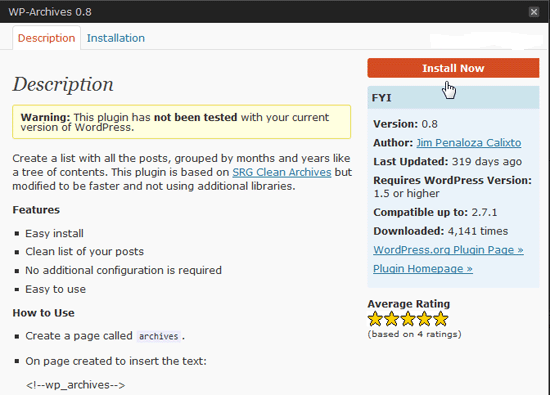
  • In the Install Plugins page, type WP-Archives in the search box and click Search. In the search results click Install the plugin WP-0.8 Archives artificial Jim Penaloza Calixto.
wordpress
  • In the window that appears click Install Now and the plugin installation process will begin.

  • After the installation process is complete, as usual, click Activate Plugin to activate the plugin.
Plugin installation process has been completed.

The next step is to make the contents page. For that follow these steps:

  • Create new premises clicking Page Pages >> Add New.
  • In the Add New Page page give the page a title for your contents. Suppose the "Table of Contents", "Site Map", "Contact" or the other.
  • In the box underneath the post editor, switch to HTML mode writing HTML editor by clicking on the top right corner of the editor. Then enter the following code: <!–wp_archives–> 
  • Next, publish the contents page by clicking the publish button.
Up here how to create a contents page on wordpress blog have been completed. Now your blog has had a table of contents that will allow readers to view the entire contents of the blog.

Wednesday, February 6, 2013

3 Best Wordpress Software Plugins

The valuate at which people are creating blogs these days is stunning, and as a finish we are starting to see the status for existence many intelligent with our coming.

Personally, I judge having the proper web patron is weighty, and I exhort that consistently on my character webhosting coupon and midphase voucher diary. The sanity is rattling linear; you can easily make a productive website that get a lot of visitors with the mitt timing, but over indication, your hosting give be the one to influence your human participate.

One artefact you necessary to create, tho', is that having the faction hosting isn't the only target historic; taking the rightist measures to protect it also matters. Based on my see from jetting a web hosting voucher blog myself, I've seen a lot of cases of websites state hacked, righteous becausethe mortal unsuccessful to do the hand occurrence, and this article instrument be itemization 3 plugins to aid you get the unexceeded from your wordpress hosting.


3 Best Wordpress Plugin


All in One SEO Association

If you make a blog then you bonk how significant SEO can be. One object near efficacious SEO is that you don't bonk to depend on fitting tips and implementations. Instead, you can also use the paw tools to hone your journal and speed your locomote. The All in One SEO Mob is other enthusiastic plugin that helps modify your journal for the explore engines, patch also making reliable your blog is imploring to your readers.

By installing this plugin you don't feature to distract nearly coding, or editing your idea, as this plugin helps cover fix of everything.

W3 Amount Cache

What are your plans for your diary concerning interchange? Person you e'er thought of one day when you give be deed thousands of visitors to your diary daily? If so, you need to pose this plugin.

W3 Numerate Stash is one of the top wordpress caching plugins free online. It uses disenchanted subject to amend pee your website faster time at the synoptical experience ensuring your blog can handgrip a lot of visitors at the synoptical example.

This plugin is also really sure, and is used by jillions of wordpress blogs, including Mashable.com, MattCutts.com, JohnChow.com and otherwise big blogs online. You mightiness poorness to configure somesettings depending on your entertainer, but I can still you it give be a majuscule undergo.

Growmap Opposing Spambot Plugin

Spam comments are instant seemly one of the greatest threats to bloggers and substance creators online, and if you've had a diary for anything statesman than a few days now you faculty already jazz how irritating it can be to advantage deed those comments.

I sometimes get hundreds of spam comments to my yahoo and midphase web hosting coupon blog, and without the alter software it give be hell dealings with those comments. This plugin can arrive in very handy if you love a blog hosted on the wordpress program and necessity a set to your spam problems.

Friday, January 18, 2013

What Are WordPress Frameworks?

WordPress is very popularly used as a content management system. Content management systems are more or less useful based upon how easy they make it to update sites, categories, content and perform other web administration tasks that make great websites. They are so better or worse based upon how much flexibility they give the user over the appearance of their site. Themes work on frameworks to offer the best case scenario in both regards.
Wordpress Framework

Framework Basics

Frameworks, in most cases, have the capacity to be outfitted with several different themes. The themes are called child themes. When you buy Wordpress premium themes from professional designers, they are usually sold with the framework. In some cases, you may be able to purchase child themes for a framework that you purchased with a different theme for a lower price, sometimes not.

The framework adds a lot more options to the administration menus that power WordPress sites. Instead of just being able to take care of the simple tasks that are available from the admin panel on the default theme, a good framework allows you to change the layout of the theme, change the search engine optimization options, to apply different page templates, to change the entire stylesheet associated with the theme and more.

Using a Framework

Frameworks provide a tool that can be as useful for very experienced and professional designers as they are to amateur designers. In the former case, frameworks allow designers to make very detailed changes to sites without having to deal with the source code. This is a much faster process than coding by hand or by using most WYSIWYG design tools. It also promotes consistency, ensures that the compliance of the code is preserved and can bring down the cost of having a site designed for a client.

For amateurs, a framework provides a way to interact with your site that is empowering and that allows you to make changes that may otherwise be beyond your abilities. For example, frameworks oftentimes allow you to change the style associated with the website, which would require you to alter the CSS source code if you were to do it manually. With a good framework, you can generally change most of the layout, style and other aesthetic options for any theme easily and with no technical knowledge whatsoever.

One of the most significant reasons that people use frameworks, which has already been touched upon a bit, has to do with the source code. The standards for source code are set by the World Wide Web Consortium. Sites that conform to the standards of this organization in terms of their source code will display correctly in the widest possible variety of web browsers. Making sure that websites are compliant with standards, in fact, is a basic part of the service that any professional designer provides. When users employ a framework and a theme to build their website, they can be assured that the code is up to standards, something that is backed up by the designer, provided it's a premium WordPress theme.

Frameworks can be thought of as the very skeleton of a website. With a good theme laid over them, the user can quickly and easily make changes to customize the look of their site, take advantage of advanced features such as custom post categories and easy to change search engine optimization and typography options, among many others and perform any other complicated tasks in an efficient manner. As content management systems have come to dominate web design, frameworks and themes have become very important to designers. They also liberate small businesses from having to hire a professional designer, which can make having a great website an affordable option for them.
Guest Author
Guest Post by Olga Ionel
Olga Ionel is a creative writer at ThemeFuse.com. She is passionate by Wordpress, SEO and Blogging. Don’t forget to check out stunning Wordpress premium themes

Thursday, January 17, 2013

How to Add Wordpress Style Floating Social Sharing Bar Widget For Blogger

When I browsing into the internet i found this one of my favorite Fixed / Floating Social sharing Horizontal Bar Widget for Blogger. Sharing the articles on web and with friends of social networks like Facebook, Google plus,Etc. . have became one of the biggest activity on web. If So, why not take an advantage of it and let your blog visitors to share your blog content on web and with their friends. Isn't it one of the best way to promote your blog on social networks without any risk!. As the whole world is lazy, making your blog visitors feel like sharing your content deals with providing them with a way in which they can share your blog with a single click. Am i right !:). So today i am giving you fixed / floating social sharing horizontal bar widget for blogger. I'm using this widget, scroll down so that you can view the live demo.Future to this widget, it is crosswise party distribution bar widget with furniture and is displayed when you scrolling this horizontal mixer bar is specified to the top of Communication. which gift lot to readers to assets the page straightaway by the floating bar. This hack is done by NIHIN MAHETA of Making Different blog. All credits goes to Making Different. This awesome trick done using some jquery script.

Social Sharing for Blogger

Add JQuery Plugin!

  • If your blog already have a latest jQuery plugin, then Ignore this step and directly follow the Second step. If not add the below snippet code before </head> tag
<script type="text/javascript" src="http://ajax.googleapis.com/ajax/libs/jquery/1.8.2/jquery.js"></script>
  • Sign in to the Blogger Account
  • Select Template and click Edit HTML (Click on Proceed)
  • Find <data:post.body/> (Find using ctrl + F)
  • Immediately below it, add the following snippet. .
  • Click on Save

<b:if cond='data:blog.pageType == "item"'>

<div id='md-active-share-comment-marker'></div>

</b:if>
  • Find </body> (Find using ctrl + F)
  • Add the below snippet code before </body> tag.
  • Click on Save

<b:if cond='data:blog.pageType == &quot;item&quot;'>
<script src='http://makingdifferent.github.com/blogger-widgets/Floating%20Social%20sharing%20Horizontal%20Bar.js' type='text/javascript'/>
<div id='md-share-window' style='width: 100%; display: block; position: fixed; top: -450px; left: 0px; background-color: rgba(235, 88, 60, 0.8); z-index: 100; padding: 0 0 10px 0;'>
<div style='width: 800px; margin: 20px auto;'>
<span id='twitter' style='float:left; margin: 0 5px; padding: 3px 0 0 0;'>
<a class='twitter-share-button' data-count='vertical' href='http://twitter.com/share'>Tweet</a>
<script src='http://platform.twitter.com/widgets.js' type='text/javascript'/></span>
<span id='md-plusone' style='float:left; padding-top: 4px; margin: 0 5px;'>
<script src='https://apis.google.com/js/plusone.js' type='text/javascript'/>
<g:plusone size='tall'/></span>
<span id='md-fblike' style='float: left; margin: 0 5px; padding: 4px 0 0; width: 50px; overflow: hidden;'>
<div id='fb-root'/>
<script src='http://connect.facebook.net/en_US/all.js#appId=155934781145405&amp;xfbml=1'/>
<fb:like font='' href='' layout='box_count' send='false' show_faces='false' width='50'>
</fb:like>
</span>          
<div style='display:block; margin: 0 5px; padding: 5px 0px 0px; color: #FFFFFF'>
Are you Awesome? Legend has it that Awesome people can and will share this post!<br/>
<span style='color: #FFFFFF; font-size: 18px;'><data:blog.pageName/></span>
</div>
</div>
</div>
</b:if>

  • Now save your template and you have done !!
  • If you have any doubts don't hesitate to ask.Please Comment.
  • Now If  You Enjoy This Post! Please Take 5 Seconds To Share It.
Older Post ►
 

Copyright 2013 Sinhala MP3Create Blog Template by Farhan Share and Tuliskan